.png?width=283&height=51&name=Admincontrol_Logo-RGB_Reverse%20(1).png "Admincontrol_Logo-RGB_Reverse (1)")
Create a meeting book and build an agenda
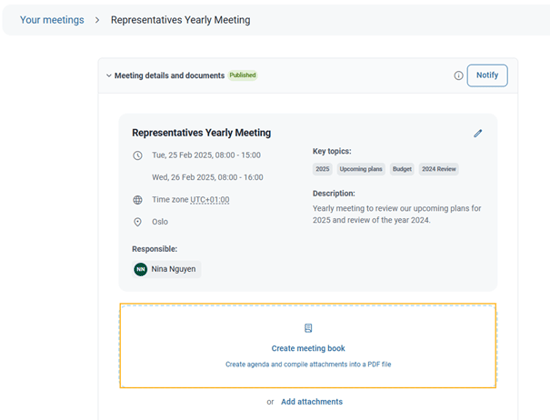
After you have created a new meeting, you are ready to build an informative agenda. To create a meeting book with an agenda you can select Create meeting book under Meeting details and documents.
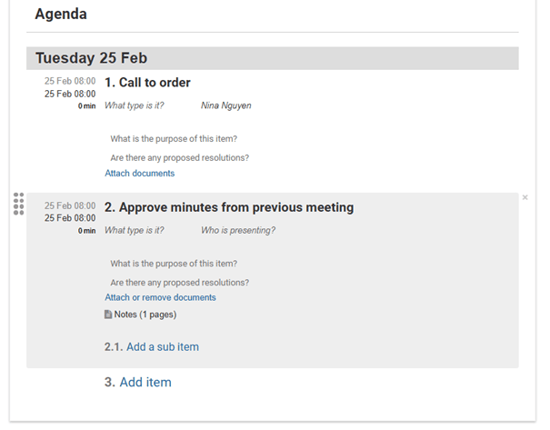
Use the agenda builder with its easy-to-use tools and type in the agenda items. Everything will be autosaved as you go.
Import an agenda from a previous meeting
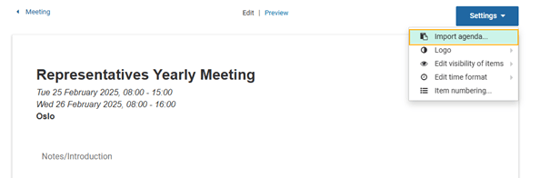
To save time, you may create the meeting agenda from a previous meeting agenda. To import an agenda from a previous meeting you can click on the Settings button and select Import agenda. All content in the selected agenda, except related documents, can be reused. You can easily amend, delete, and change sort order with drag and drop.
Personalize the agenda
Add a logo
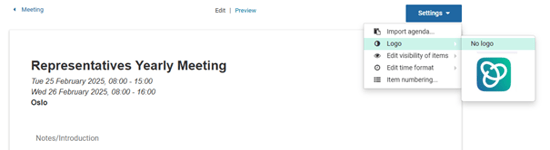
If you have uploaded a logo to your portal, you can add the logo to the agenda by clicking on the Settings button and selecting an uploaded logo under Logo.
Choose time format
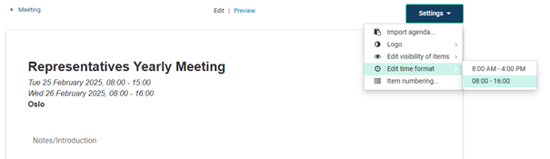
You can choose the time format for the agenda by clicking on the Settings button and choose between the 24-hour clock format or the 12-hour clock format under Edit time format.
Headings
The agenda heading is the same as the meeting title. You may change the text Agenda to something else if desired.
Watermarks, paging and item duration
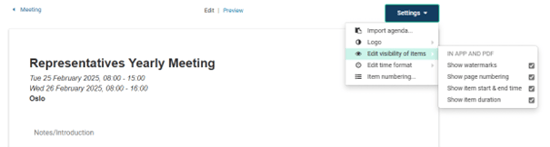
Click on the Settings button and select Edit visibility of items in the menu to enable or disable watermarks and page numbering in the meeting agenda. In the same menu you can select to show the agenda item duration and/or the start and end time.
Select item numbering style
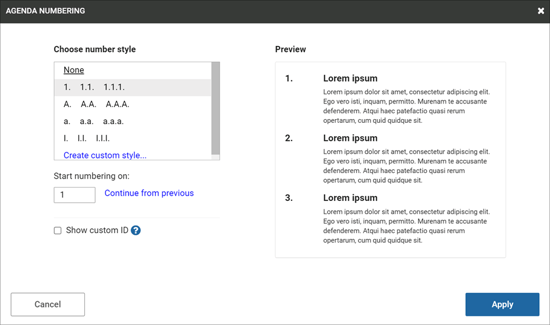
To select the number style, you can click on Settings and select Item numbering. You have the option to select what number the agenda items should start from, select the numbering style or choose customized numbering for your agenda.
Read more about Agenda numbering here.