.png?width=283&height=51&name=Admincontrol_Logo-RGB_Reverse%20(1).png "Admincontrol_Logo-RGB_Reverse (1)")
Engage in discussions around documents in a secure environment with your fellow board members.
To Discuss a Document
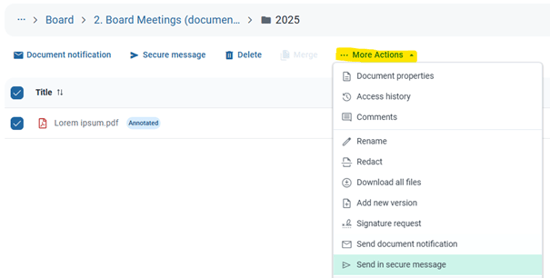
1. Access and Select Documents
- Go to the Documents section in the web application.
- Select the document(s) you wish to discuss.
2. Initiate a Secure Message
- Click on More Actions or the cogwheel icon.
- Choose Send in Secure Message.
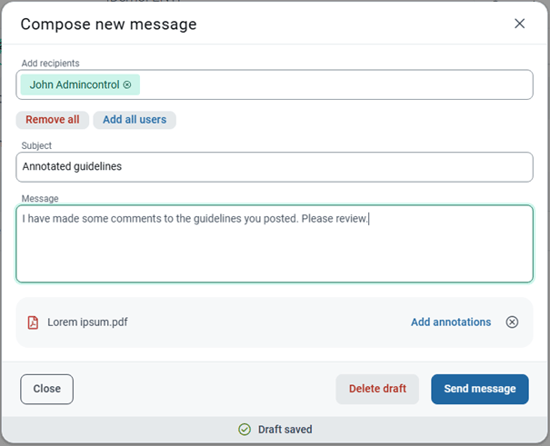
3. Select Recipients and Compose Your Message
- Select your recipients from the list. Note that the recipients list includes all users in the portal with access to the document(s).
Sharing Annotations
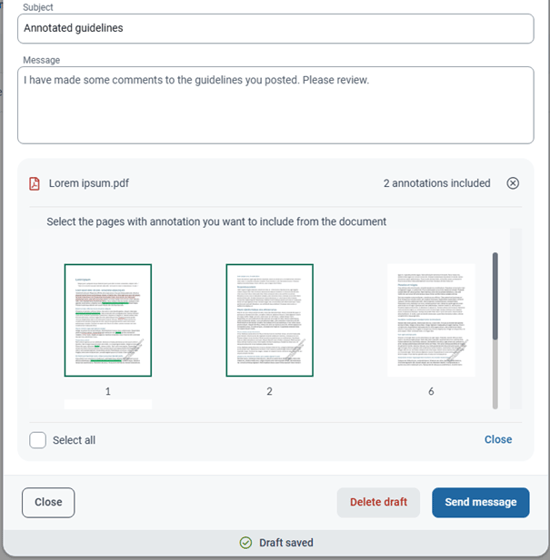
- If the document contains annotations, choose to share them by clicking Add Annotations in the "Compose New Message" modal. Select the annotated pages to include.
- To share all annotations, simply click Select All.
Managing Document Attachments
Remove Documents
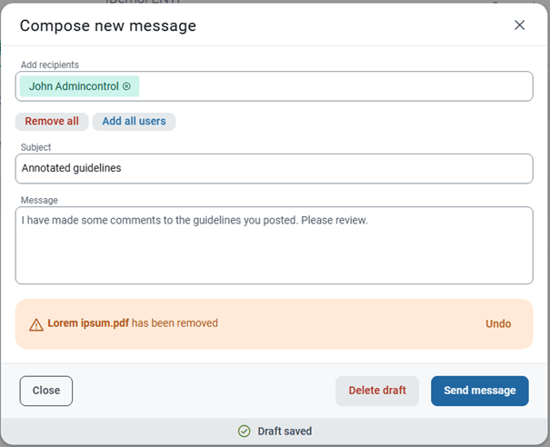
- To remove an incorrectly added document, click the 'x' at the end of the document name.
- If a document is removed by mistake, use the undo option to restore it.
Viewing and Responding to Shared Documents
- When recipients open the document from the message, it will display in the viewer.
- They can read the document and then return to the message to respond to the sender.