.png?width=283&height=51&name=Admincontrol_Logo-RGB_Reverse%20(1).png "Admincontrol_Logo-RGB_Reverse (1)")
If voting is enabled in your portal, users can cast votes on documents via the Admincontrol iOS app.
Set up voting on a document
To set up voting on a document, you can do the following on the web-version of Admincontrol:
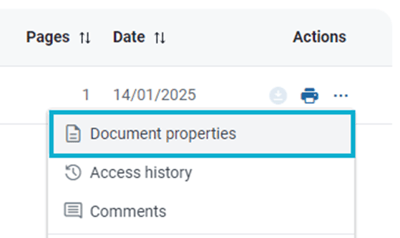
1. Locate the document and go to the Document properties under More Actions.
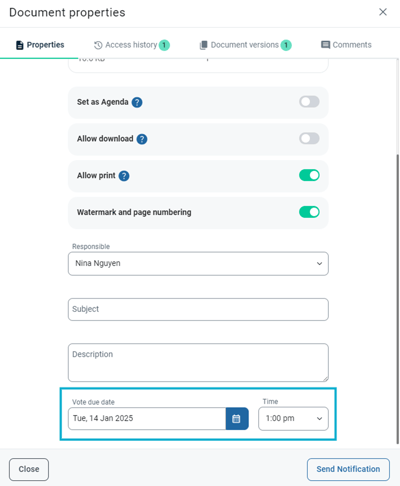
2. In the document properties window, set a vote due date and time. Changes made in the document properties window saves automatically. After you have set a vote due date and time, voting will be enabled on the document.
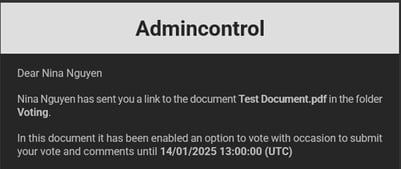
Document notification for a document with voting enabled
When you send a document notification for a document with voting enabled, the users that receive the document notification will be informed of the option to vote on the document along with the due date and time for when the voting will close.
Submit a vote on a document using the iOS app
To submit a vote on a document with voting enabled, you can do the following on the Admincontrol iOS app:
1. Go to Documents in the app and navigate to folder that the document is located in. If a document has voting enabled, a thumbs up icon is highlighted below the document’s details.
.png?width=400&height=329&name=blobid1%20(1).png)
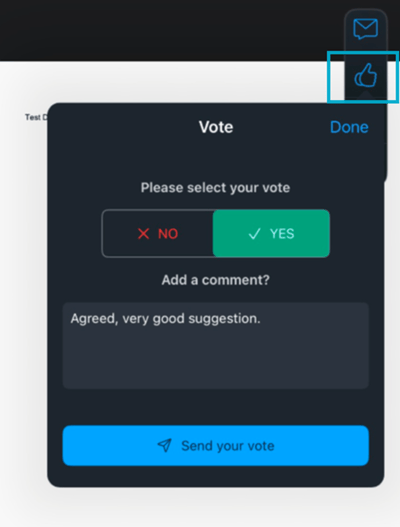
2. Select the document to open the document in the document viewer. Click on the thumbs up icon in the action bar to open the voting pop-up window. In the pop-up window you can cast your vote and choose to optionally add a comment. Click on the blue Send your vote button to submit your vote.
View voting status and change your vote
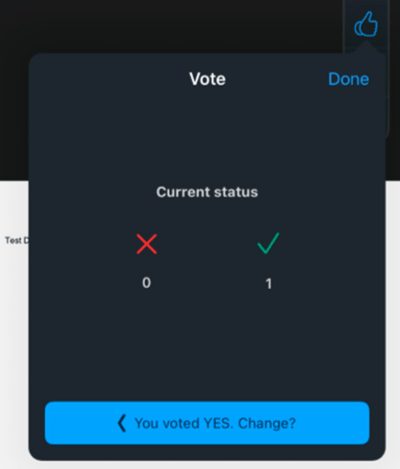
If you have already submitted your vote, you can change your vote at any time before the end time. To change your vote, click on the thumbs up icon in the action bar to open the voting pop-up window and click on the blue "You voted (✓/✕). Change?" button.
View the results of a vote
The results will be listed under Reports > Voting Report. This will list the document and the voting results. It will also include the amount of yes/no votes, and any comments added. Please note that only Administrators and Content Administrators have access to this report.
