.png?width=283&height=51&name=Admincontrol_Logo-RGB_Reverse%20(1).png "Admincontrol_Logo-RGB_Reverse (1)")
If you have a new email address, you can change the email associated with your Admincontrol user account without creating a new account. By doing this, you will retain all information stored in your current account.
It is only possible to change the mail address associated with your own personal user account. Administrators are not able to update the mail address of other users.
To change the mail address on a user profile, follow these steps:
Step 1: Log in to your account
Go to https://login.admincontrol.net/ and enter your login details.
Step 2: Edit your profile
Navigate to 'My Profile' and select 'Edit Profile.'
Step 3: Update your email
Enter your new email address in the 'Email' field and click 'Save.'
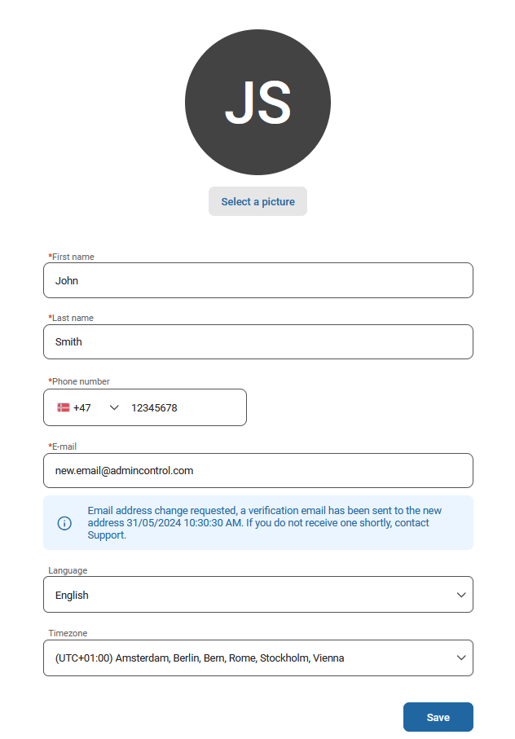
Step 4: Verify the new email address
The new email address has to be verified for the change to take place. A verification email will be sent to your new address. To complete the change, open the email, click on the 'Verify Email Address' link, and log in to the service.
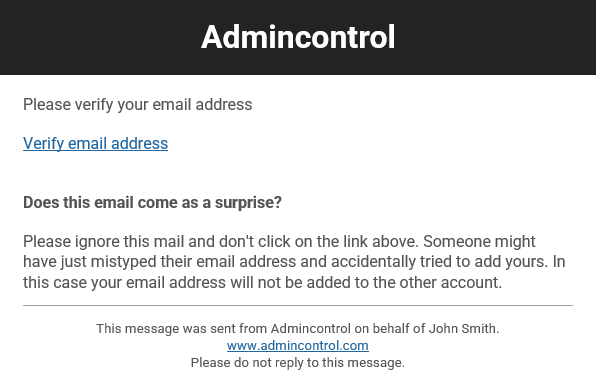
If you do not receive the verification email, please contact our support team.