.png?width=283&height=51&name=Admincontrol_Logo-RGB_Reverse%20(1).png "Admincontrol_Logo-RGB_Reverse (1)")
This function allows you to set a new index number for the folder you are currently viewing, including all subfolders and documents, saving you time when building the data room.
Reindexing the Entire Data Room
To reindex the entire data room:
- Navigate to the root folder (Data Room).
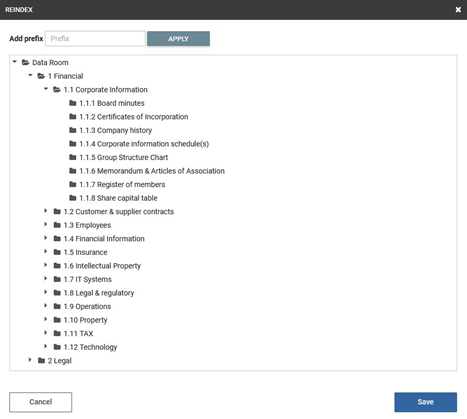
- Select More actions > Reindex.
- If you press Apply without adding a prefix, the system will automatically assign prefixes like 1, 2, etc., to parent folders, and 1.1, 1.2, 1.1.1, 1.1.2, etc., to subfolders.
Adding a Prefix Value
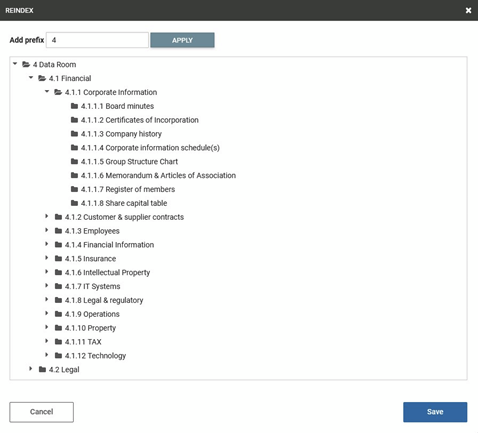
- If you add a value (e.g., "4") in the prefix field, it will be used as the initial value.
- Parent folders will receive prefixes like 4.1, 4.2, etc.
- Subfolders will receive prefixes like 4.1.1, 4.1.2, 4.1.1.1, 4.1.1.2, etc.
Reindexing Specific Subfolders
To reindex items within a specific subfolder:
- Open the target location.
- Press More actions > Reindex.
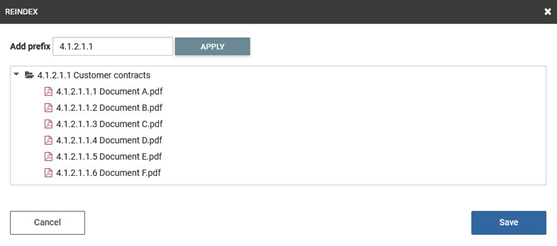
- The existing prefix will be displayed automatically in the prefix field when reindexing the contents of a subfolder.
Example:
Below is an example showing the previously applied prefix to the documents in the target subfolder.