.png?width=283&height=51&name=Admincontrol_Logo-RGB_Reverse%20(1).png "Admincontrol_Logo-RGB_Reverse (1)")
This section gives you an overview of all the users in the data room and their roles.
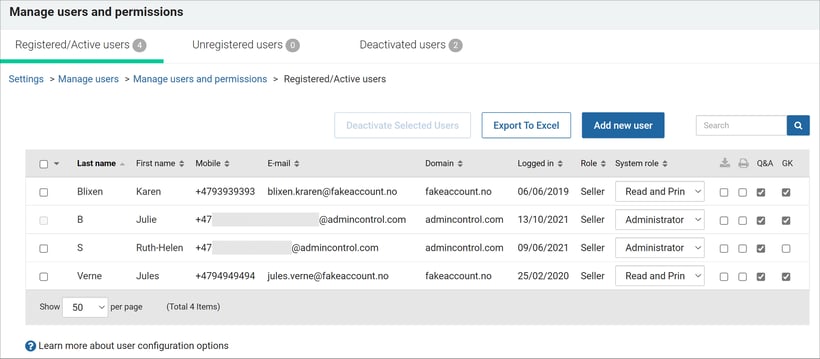
Registered/Active Users
Displays a list of all active users. You can edit their system role and configure their user profile. Click on a user's name to view their profile and edit their access levels.
Unregistered Users
Shows all pending invitations to the portal. You can resend, renew, or delete invitations. Once a user registers via the invitation link, they will be added to the list of Registered/Active Users.
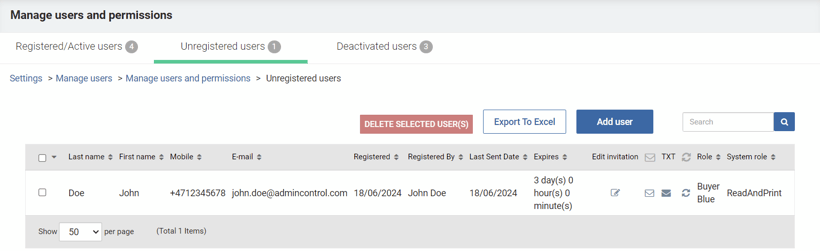
To resend an expired invitation, click the white envelope next to the user to renew the invitation link and send a new email notification.
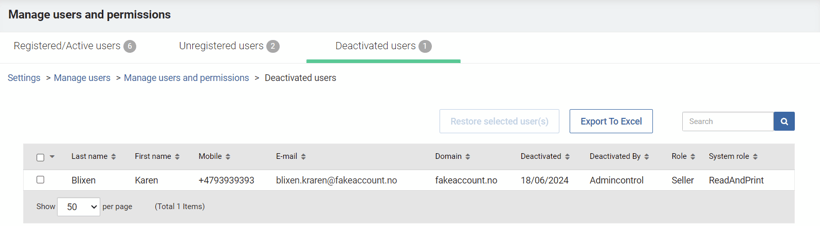
Deactivated Users
Lists users who have been deactivated, with the option to reactivate them. When reactivated, users are moved to the Registered/Active Users list with the same access they previously had.