
 Boards & Governance
 M&A & Transactions




.png)





.png)
 Board Management Software
 Customer stories
 Insights
 Events & Webinars
 Security & Privacy
 Product updates

.jpg)




-Jul-03-2026-06-32-50-9626-AM.png)
 Login
Login
September 2019
Highlights from web version 4.8 and app version 4.6.1
Enhancements in the Meeting Minutes feature
The new Admincontrol edition now has a complete workflow for the secretary for the Meeting Minutes, from creating the minutes to having it signed (also electronically) and approved, all this by working from the minutes’ interface.
The secretary is now able to share and discuss the minutes with the board members or meeting participants, update the minutes and request approval by signature from the minutes’ interface. The statuses will be updated in the meeting view, and when signatures are completed and approval achieved, the minutes will be stored to the default Meeting Minutes folder.
.jpg?width=830&height=338&name=Share%20minutes(1).jpg)
When requesting electronic signatures for the minutes, the secretary needs to have administrator rights and have access to the default Meeting Minutes folder. All features for following status or updating the signature requests details will be available with link from the meeting view or the signature tab (add/remove users, extend due date etc).
.jpg?width=830&height=234&name=Go%20to%20request(1).jpg)
.jpg?width=830&height=625&name=Manage%20signature%20requests(1).jpg)
To fully enjoy the benefits of electronic signing of minutes, please make sure that users requested to sign by electronic signature also have access to the default Meeting Minutes folder.
iPhone/iPad app:
With the implementation of electronic signing of Meeting Minutes on web, we have added support for this on the app. When a signature request for Meeting Minutes is sent to a user, the user is prompted with a signature request when logging in.
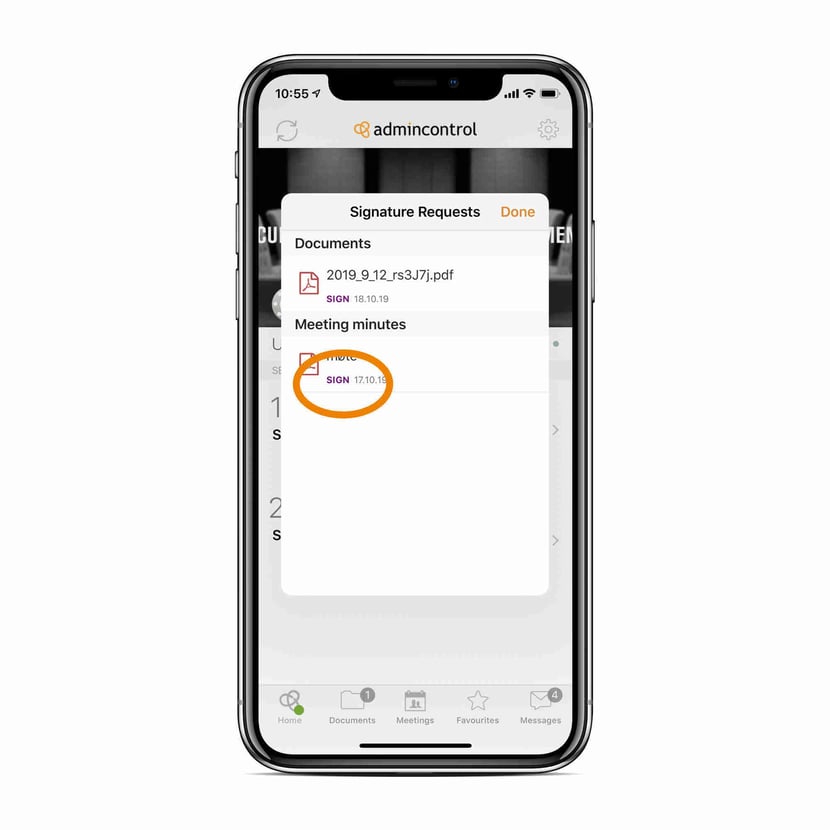
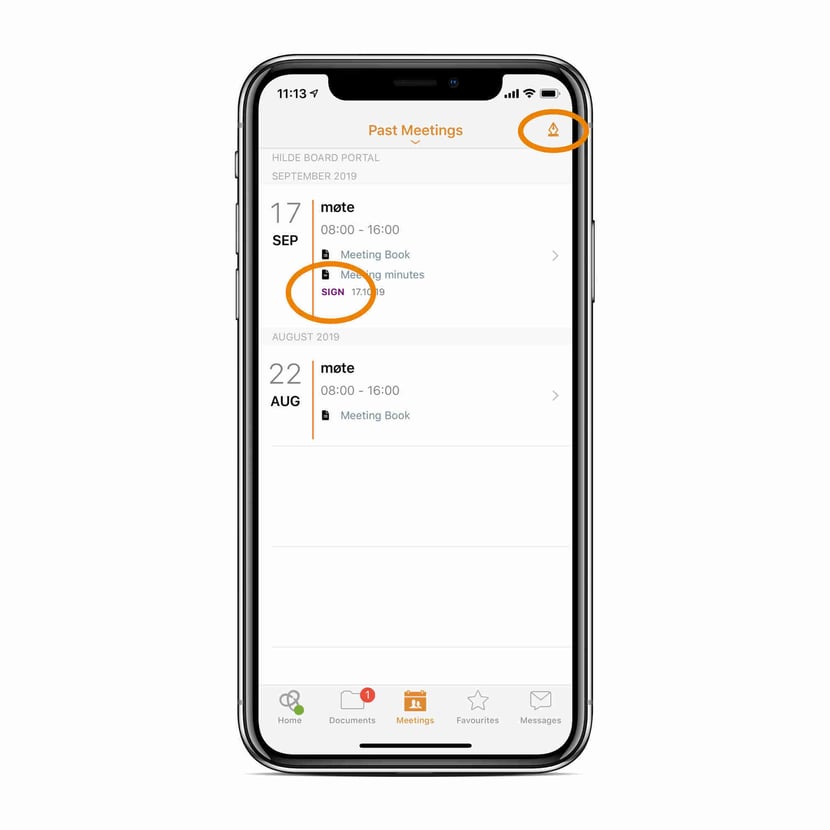
If the signature request modal is dismissed without starting the signing process you will be able to start the signing process from the meetings tab. Both with a signature button at the top of the meetings list, and if you navigate to the meeting and open the Meeting Minutes.
 Absence/ Presence:
We have made an improvement on how to set participants present or absent to a meeting in the minutes.
We have enabled a selection of two attendee groups;
- The first group is defined to the participants that should be present at the whole meeting. Within this group you can set any participant absent to one, several or all agenda items. This is the default group proposed when creating the minutes.
- The second type of group is defined to the participant that should be present at one or several agenda items, but not all.
- You can select a combination of these two types of groups in the Meeting Minutes, as best suited for your minutes and procedures.
.jpg?width=830&height=554&name=Add%20group(1).jpg)
We have also made some design improvements to the attendee cards in the Meeting Minutes.
We have enabled the option to choose whether an attendee’s absence should be shown in the specific agenda items or not. This selection can be found under Settings when editing the minutes.
.jpg?width=830&height=484&name=Absence(1).jpg)
With the completion of the workflow for Meeting Minutes we have also made some improvements to the following features:
- When a secretary has started to share minutes with a user and decides to do further changes to the document, the user will be informed with a message in the Meeting Minutes conversation when the secretary has chosen to share the new changes.
- When a secretary has shared minutes with a user and the secretary is changed, the user will be informed with a message in the Meeting Minutes conversation.
- We have removed the option to change the status from the cogwheel. You can still use the drop-down list in meeting view as an alternative to the Approve or Sign (electronically or manually) button in the minutes view.
- We have replaced the Go to folder link in the cogwheel with a link in the Minutes pane in the meeting view.
- We have changed the naming of the status Ready for approval to Being approved.
- We have made it easier to identify the default Meeting Minutes folder from the folder structure. The folder icon has been given a green colour and we present an information text when viewing the default folder.
My Profile – Settings
We have a new section under My profile - Settings, called Active sessions, presenting the list of all your active sessions of your account for web and app. This can be used to verify and manage your current active sessions.
Finnish BankID
The Finnish TUPAS will become obsolete on 30th September 2019 as it will no longer meet the threshold of strong authentication according to EU eIDAS regulation. To replace TUPAS, The Finnish Trust Network (FTN) has been established by the Finnish government. This is a framework that allows strong authentication service brokers to resell eID solutions in Finland.
To be able to sign documents in Admincontrol using FTN, Finnish users must give their consent to their personal data being processed by our eID broker Signicat (approved by Traficom - The Finnish Transport and Communications Agency). No signature request can be completed before such consent is given.
Starting October 1st 2019, TUPAS no longer qualifies for Strong Customer Identification, according to the Finnish Act on Strong Electronic Identification and Electronic Signatures.
Some banks may still be working on adding support for FTN. This means that the document signing may not work, or that the Tupas method will be used which may not be a legally valid signature for all documents. Contact your bank for additional information about FTN or Admincontrol for further assistance.
How:
The process for giving consent has been added to the activation process of Finnish BankID, and our current users must approve to this consent when transferring to Finnish BankID.
.jpg?width=830&height=319&name=esignature%20processing%20of%20data(1).jpg)
If you are using an old version of the Admincontrol iPhone/iPad app, you will be prompted with a message to update your app in order to set up the new signature method