
 Boards & Governance
 M&A & Transactions




.png)





.png)
 Board Management Software
 Customer stories
 Insights
 Events & Webinars
 Security & Privacy
 Product updates

.jpg)




-Jul-03-2026-06-32-50-9626-AM.png)
 Login
Login
August 2025
Board portal release notes – August 2025. This release refines the direct links to the agenda and the meeting book that were introduced earlier in 2025, so that administrators and content administrators land on the right version of a document depending on whether it is a draft or has been published.
Meeting list and meeting book improvements
In a previous release, we introduced direct links to the agenda and meeting book for all board portal users. For administrators and content administrators, the link directs to Edit pages. For other users, the link directs to the View pages.
In this release, we have made the following improvement where Administrators and Content administrators will now access the agenda and meeting book after publishing in View. When accessing the agenda or meeting book from the meeting list and the meeting page it will be clearly presented if you can edit or view the document. When a document is in draft, it will still be linked to as Edit.
.png?width=750&height=223&name=bilde%20(6).png)
.png?width=750&height=226&name=bilde%20(7).png)
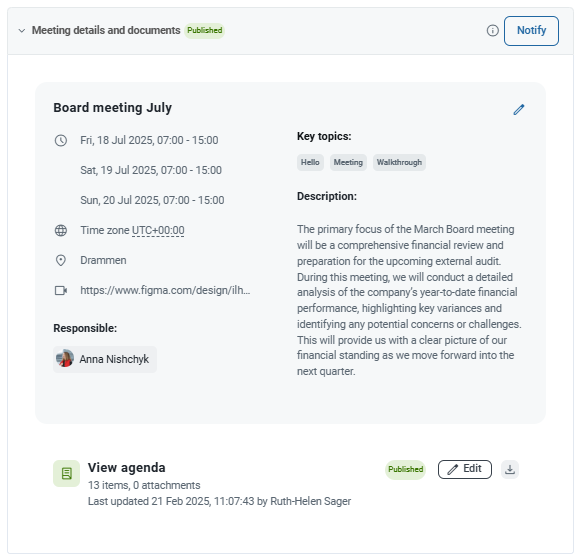
What this means for you
- Published documents open in View. After an agenda or meeting book has been published, administrators and content administrators who click the link in the meeting list or on the meeting page now open the View page, the same page board members see. This makes it easy to check exactly what participants receive.
- Drafts still open in Edit. As long as a document is in draft, the link opens the Edit page so you can continue working on it.
- Clear labelling. Each link states whether it opens the document for editing or for viewing, so you always know which mode you are entering before you click.
- Board members and other users. Nothing changes for users without administrative rights; their links continue to open the View pages.
Applies to: Board portal web application, users with the Administrator or Content administrator role.
Related help articles: Meetings overview, Build your digital agenda, Publish the meeting and notify users, System roles.