
 Boards & Governance
 M&A & Transactions




.png)





.png)
 Board Management Software
 Customer stories
 Insights
 Events & Webinars
 Security & Privacy
 Product updates

.jpg)




-Jul-03-2026-06-32-50-9626-AM.png)
 Login
Login
April 2025
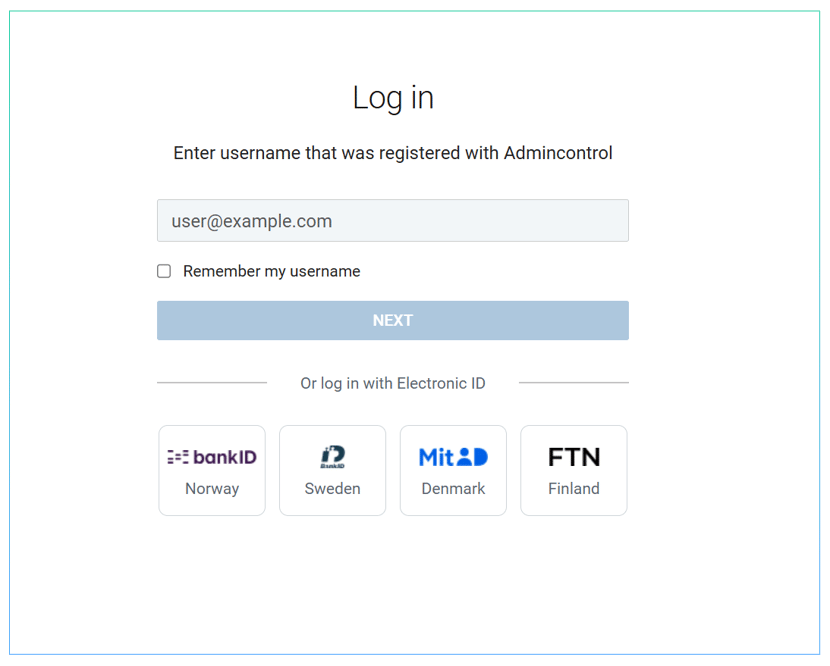
Release notes – April 2025. This release updates the design of the Admincontrol login page for both the board portal and the data room. It is a visual and structural change only: your username, password, two-factor method and electronic ID options all work exactly as before.
The login page design has been updated to accommodate for future improvements to the login flow. The login process will remain unchanged.
Note that the electronic ID log-in options are found below the username field on the login page.
What this means for you
- Same steps, new layout. You still enter your username, then your password or choose an electronic ID. The order of the elements on the page has changed to make room for improvements to the login flow that will arrive in later releases.
- Electronic ID. The buttons for logging in with an electronic ID (for example BankID or MitID) are now placed below the username field. If you cannot find them, scroll down on the login page.
- Two-factor authentication. SMS codes and authenticator apps are unaffected. If you have problems receiving a code, see the troubleshooting article below.
- Bookmarks and password managers. The login address has not changed, so saved logins and bookmarks keep working.
- Apps. The iOS and Android apps use the same login service, so the change is visible there as well.
- No action required. Neither users nor administrators need to change any setting. The new page is delivered automatically to all portals, and the browsers and devices you use today continue to work.
- If something looks unfamiliar. Take a moment to read the page from top to bottom: the username field comes first, the password and electronic ID options follow. If a login option you used before is not visible, contact our support team.
Applies to: Board portal and data room, web application and mobile apps.
Related help articles: Log in, Two-factor login, SMS security code troubleshooting, eID and consent, Reset password.