
 Boards & Governance
 M&A & Transactions




.png)





.png)
 Board Management Software
 Customer stories
 Insights
 Events & Webinars
 Security & Privacy
 Product updates

.jpg)




-Jul-03-2026-06-32-50-9626-AM.png)
 Login
Login
September 2024
Board portal release notes – September 2024. This release lets survey owners add their own questions to the board evaluation survey, so the standard survey battery can be combined with questions that matter specifically to your board.
Custom quotes for board evaluation
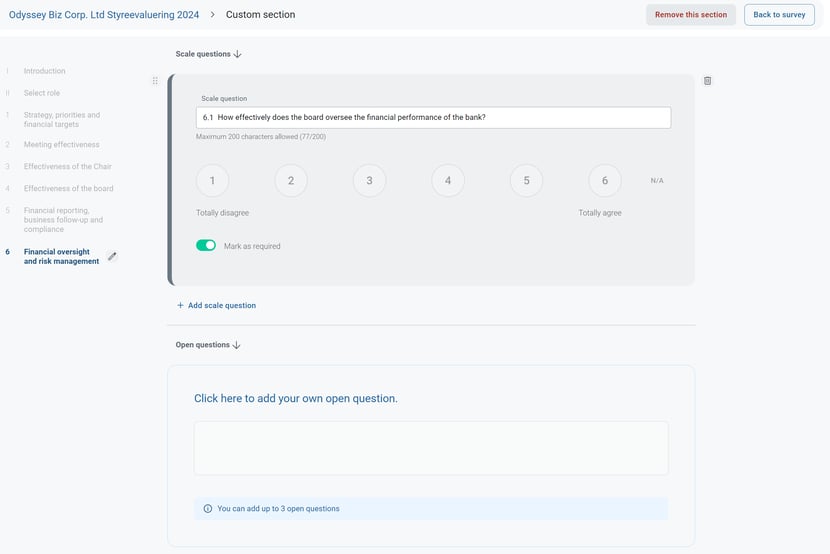
You can now add your questions to the board evaluation survey! Combine new questions tailored to your board with the existing survey battery for a better evaluation process.
You can add up to 10 scale and 3 open questions.
What this means for you
- Custom questions. Add up to 10 scale questions, answered on the same scale as the standard statements, and up to 3 open questions with free-text answers. They are presented to respondents together with the existing survey battery.
- When to use them. Typical additions cover topics that the standard battery does not address for your organisation: a recent merger, a new strategy period, committee work, owner expectations or the cooperation between the board and the executive team.
- Writing good questions. Keep scale questions to one statement each so the answers can be compared, and use open questions where you want examples and suggestions rather than a score.
- In the report. Answers to custom questions are included in the results together with the standard areas, so the presentation for the board discussion covers both.
- Respondents. Board members answer custom questions in the same survey flow in the app or on the web; nothing changes for them.
- Per survey. Custom questions are added to the survey you are setting up, so you can vary them between years or between the board and its committees while the standard battery stays the same for comparison over time.
- Getting help. The performance evaluation articles below describe how to create, send and close a survey; custom questions are added in the same place where you set up the survey.
Applies to: Board portal web application, board evaluation survey module (survey owners).
Related help articles: Create a survey, Send the survey, Respond to the survey, Close the survey and create a report.