
 Boards & Governance
 M&A & Transactions




.png)





.png)
 Board Management Software
 Customer stories
 Insights
 Events & Webinars
 Security & Privacy
 Product updates

.jpg)




-Jul-03-2026-06-32-50-9626-AM.png)
 Login
Login
Sometimes, the wrong document or document version is selected when creating a signature request. This may be discovered by you or reported by a signer. If the document sent for signing needs to be replaced, you must cancel the ongoing signature request and create a new request with the correct document.
How to cancel a signature request
1. Go to Signatures > Pending requests.
2. Locate the signature request you want to cancel and click anywhere on it to open the request details.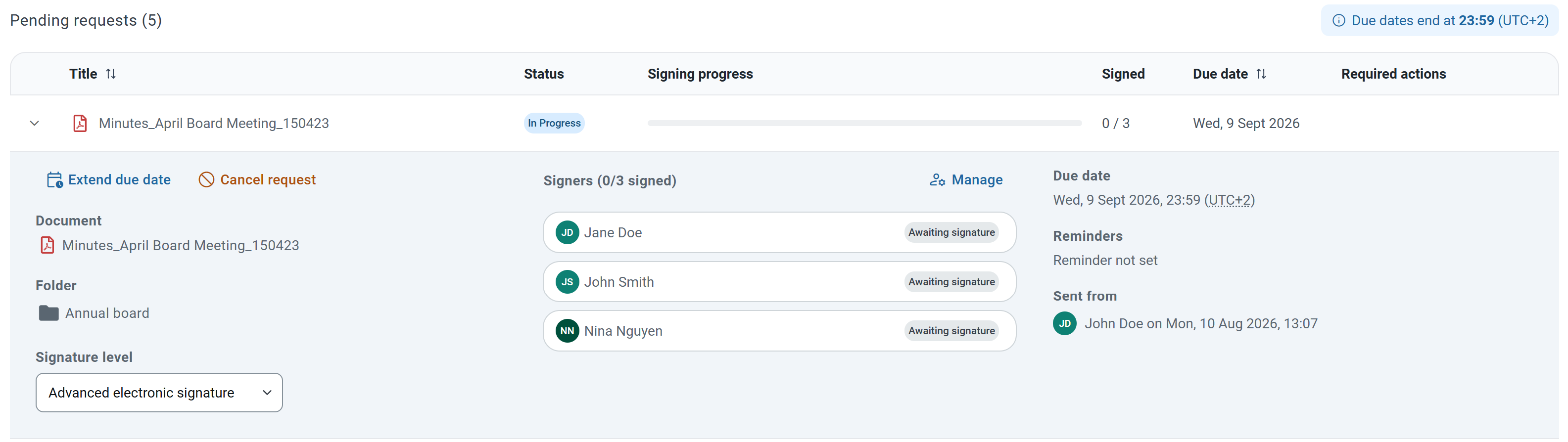
3. Click on Cancel request in the upper-left corner.
4. Confirm the cancellation by clicking Cancel request.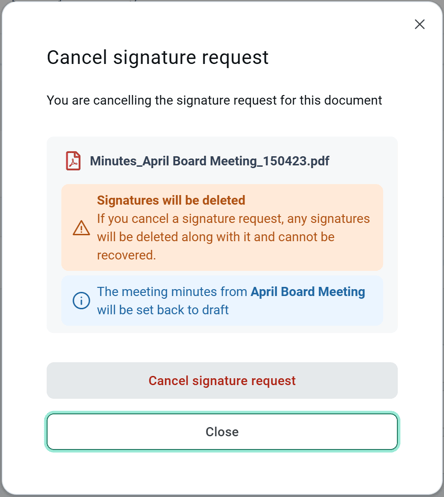
Important: Cancelling a signature request cannot be undone. Any signatures that have already been completed on the document will be deleted and cannot be recovered.