Boards & Governance
 M&A & Transactions




.png)





.png)
 Board Management Software
 Customer stories
 Insights
 Events & Webinars
 Security & Privacy
 Product updates

.jpg)




-Jul-03-2026-06-32-50-9626-AM.png)
 Login
Login
As the purpose of signed documents is that they should include validation information, the signature certificate will accompany it when downloaded from the Admincontrol solution.
When it is required to share signed documents outside the Admincontrol solution where you do not want sensitive personal information to appear please print the electronically signed document to PDF to exclude signature certificate and sensitive personal information.
If you have any questions regarding the sensitive personal information included in an electronically signed document, please contact Admincontrol Support.
Download the electronically signed document
To download the electronically signed document, please navigate to the folder where the signed document is located.
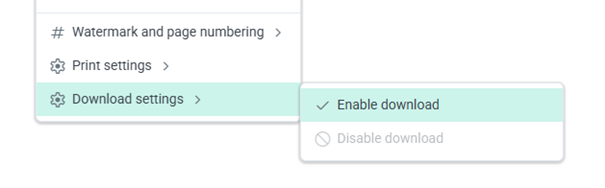
To download a document from Admincontrol, download needs to be enabled in the document settings for the document. You can access this setting under More actions when the document has been selected.
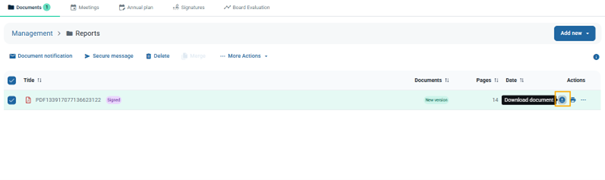
When downloading is enabled on a document, you may download the document by clicking on the download icon under Actions to the right of the document.
Print the electronically signed document to PDF
When it is required to share signed documents outside the Admincontrol solution where you do not want sensitive personal information to appear, the following approach is recommended;
- Download the signed document from Admincontrol
- Open the signed document in your PDF program
- Use the PDF program to print the signed document to PDF (this will then create a copy of the pdf without the signature information and without sensitive personal information)
Please note that such a copy does not contain validation information in the document, and cannot be used for verification purposes.
Print to PDF directly from Admincontrol
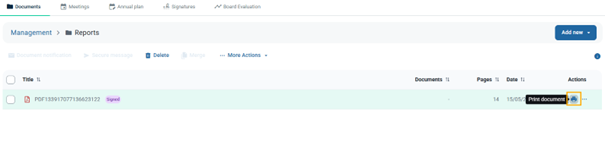
It is also possible to choose print to PDF directly from the Admincontrol viewer, to save a copy of the signed document without the signature information and without sensitive personal information.
Please note that such a copy does not contain validation information in the document, and cannot be used for verification purposes.
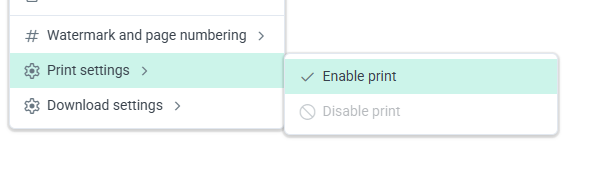
To print a document from Admincontrol, print needs to be enabled in the document settings for the document. You can access this setting under More actions when the document has been selected.
When printing is enabled on a document, you may print the document by clicking on the print icon under Actions to the right of the document.