
 Boards & Governance
 M&A & Transactions




.png)





.png)
 Board Management Software
 Customer stories
 Insights
 Events & Webinars
 Security & Privacy
 Product updates

.jpg)




-Jul-03-2026-06-32-50-9626-AM.png)
 Login
Login
The home page is the first page after login and your starting point within the Board portal.
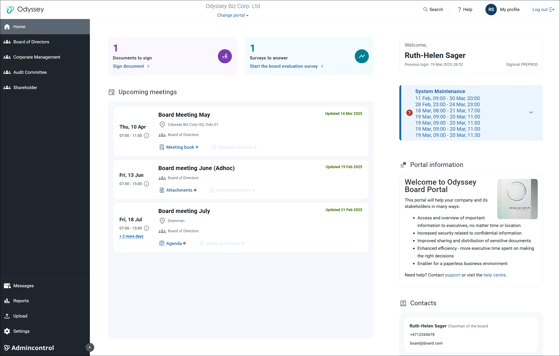
Signature and board evaluation requests
Signature requests and board evaluation surveys are located at the top of the home page. The new placement allows for a better overview and visibility of your to-do's.
Upcoming meetings
Your upcoming meetings are visible in the meeting overview. Access the meeting or meeting book, meeting minutes and attachments directly from the home page.
Change portal
At the top, you will find the drop-down menu with the portals (typically different organizations) where your user is active. In the left column, you can navigate the areas of use you have access to on the selected portal. This section also contains links to reports, uploading and settings.
Customer messages
Users will be alerted about general maintenance of the service or be able to read information regarding upcoming releases and new features in the service offering.
Portal information
Administrators can add relevant information to the portal that is visible for all users with access to the selected portal.
Contacts
You can add relevant contact information to the home page. The home page is visible for all users with access to a portal, and adding the contact information of relevant key stakeholders can be of value to users. Note that you can add a maximum of three contacts.
How to edit the home page
Administrators can edit the homepage text directly in their portal, from the homepage. They have the option to add text, images, and links.
Links will be sanitized and only links to Admincontrol owned domains can be added as clickable. Links added that point to other domains than Admincontrol will be converted to plain text.
Images uploaded in the editor will be added to an image repository and saved so that they can be reused in the future. Supported file formats are .png, .gif, .jpg, .jpeg, .bmp.
If you have any questions or need assistance, you can contact support via the “Help” function.
Add portal icon and logo
Administrators are given the possibility to add and edit portal logo and icon in the portal in Settings - Global system settings.
.jpg?width=560&height=290&name=Settins%20BP(1).jpg)
Set the default logo, icon and banner for the portal.
.jpg?width=560&height=298&name=Change%20logo(1).jpg)
The portal logo will appear in the upper left of your screen on every page to brand your portal and the icon will be visible in the dropdown for changing portals, if you are connected to more than one. The banner will appear in the app. The images will also be available in the image repository to use in other areas.