
 Boards & Governance
 M&A & Transactions




.png)





.png)
 Board Management Software
 Customer stories
 Insights
 Events & Webinars
 Security & Privacy
 Product updates

.jpg)




-Jul-03-2026-06-32-50-9626-AM.png)
 Login
Login
To maximize efficiency while using Secure Messaging, it's highly recommended to activate notifications. This ensures you receive email alerts when you have messages waiting for your attention.
Activating Notification
Under Messages:
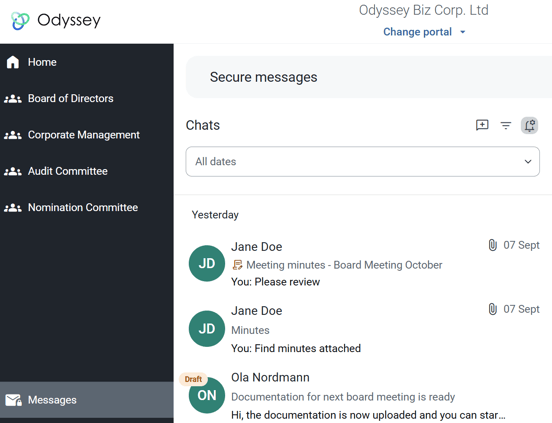
- By clicking the bell icon, you can access your email notification settings for secure messages:
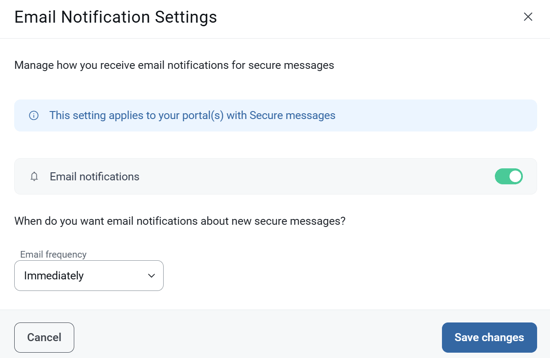
In the window that appears, you can choose to enable/disable notifications, and select frequency.
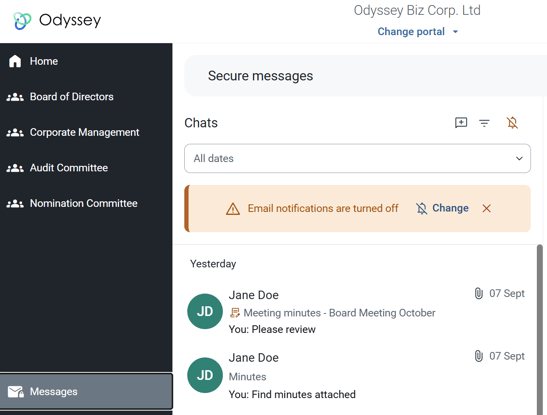
If you do not have notifications enabled on your profile, a banner will display in your secure messaging inbox:
- You can also manage notifications under My Profile > Emails and notifications
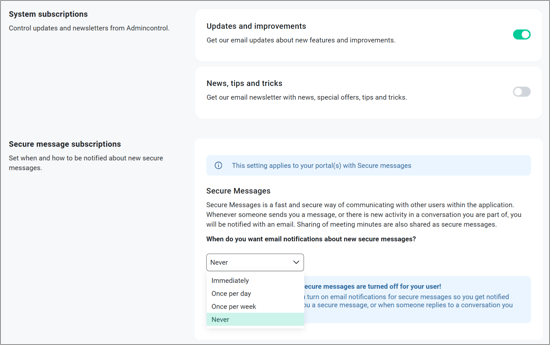
Notification Options
Frequency of Notifications:
Choose to receive notifications:
- Immediately: Get notified as soon as a new message arrives.
- Once per Day: Receive a daily summary of unread messages.
- Once per Week: Get a weekly summary of unread messages since the last notification.