
 Boards & Governance
 M&A & Transactions




.png)





.png)
 Board Management Software
 Customer stories
 Insights
 Events & Webinars
 Security & Privacy
 Product updates

.jpg)




-Jul-03-2026-06-32-50-9626-AM.png)
 Login
Login
About external online video meeting links
Providing hyperlinks to users in Admincontrol services is a convenient way of giving access to external content to users: However, due to links potentially containing malicious content or provide access to information that they are not authorized to access, providing links can also represent a threat to security if not controlled properly.
- How to check if a link is safe? Clicking on a malicious link can lead to compromised accounts and malware infection. Please take appropriate measures to ensure the link is safe before clicking on it.
- Why should I check if the link is safe? Phishing is a social engineering attack that aims to get a victim to reveal sensitive information by posing as a legitimate person or company. Phishing can be done through emails, SMS, social media and even on a corporate network within a company. Therefore, always check whether a link is safe, you can never be 100% certain where the link is coming. Keep in mind that the account of the user that is sending you the link may have been compromised. Rather than clicking on the link, if possible, navigate to the official site yourself.
- Tips to check if a link is safe. When you hover over the link, with your mouse, you should get a preview of the URL, does the link match the text of the link that has been shared? Is the domain misspelled? Does the domain extension look strange? Does the link use http and not https?
Online video meeting in your board portal
In your meetings organized inside a Boardportal in Admincontrol, it is possible to provide a link to a videoconferencing system so that the meeting participants can join your online meeting. The meeting link will be provided as easily accessible by redirecting the user to the external service.
Depending on how the different videoconferencing systems structure their links, some meeting links may be automatically validated to be an actual meeting link and not something else. For meeting links from providers that can be automatically validated we provide a direct redirect solution.
The video conferencing systems supported in redirected solution are Teams and Google Meet. Any other provider will be presented with a full link, and we strongly advice the users in the solution to verify whether the link is safe before redirecting to the meeting.
How to obtain invite link from external conference tools?
The Online meeting field can recognize URL addresses (meaning the link in the https://... format) from certain external conference tools and present them as a Join Meeting button.
You will first need to create the online meeting or find the previously scheduled online meeting in the external conference tool of your choice (Microsoft Teams, Google Meet, Zoom etc.). Look for an option to copy the invite link that the participants can use to join the meeting. You will only be needing the URL address in the format of "https://..." . You can add other information, such as a passcode to the Zoom meeting, in the meeting description field.
How to add external online meeting links to a meeting?
To add the external online meeting link to the meeting you can either edit an existing meeting or create a new meeting. After copying the link address from the external videoconference tool, you can paste it in the Online meeting field in the Create/Edit meeting window.
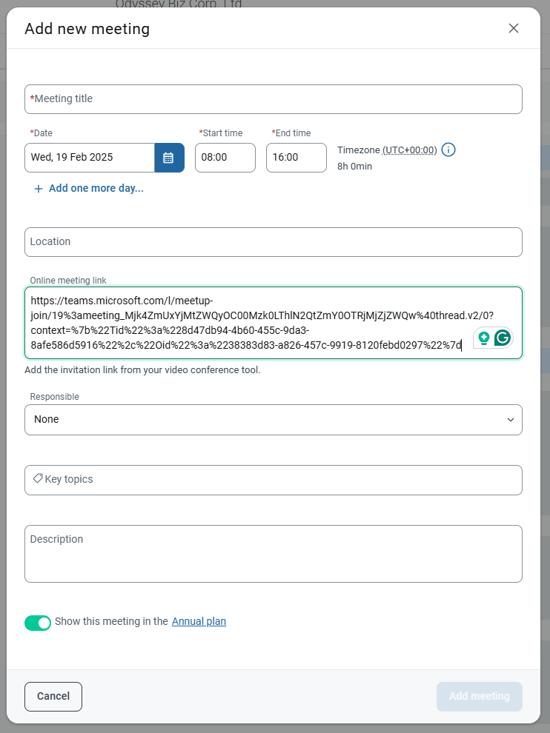
Do note that due to our security policy, the link will not be added to the notifications sent to the participants about the meeting.
Common online meeting links issues
Copying the entire invitation text instead of only the URL
If you cannot directly copy the URL (https://...), you can try pasting the text in the description field of the meeting and selecting the URL from there to then add it to the Online meeting field.
Copying the hyperlink text instead of the URL
If the invite link is in the form of a hyperlink, which shows an underlined text like Join meeting, then you will probably have to right click and choose Copy URL or Copy Link.
Not copying the entire URL address of a verifiable external videoconference system
If any part of the URL address has not been copied and a few characters are missing, while the URL is from a video conference tool that can be verified, an error message indicates this. Double check that the whole link is copied and try pasting it in the field again.