
Boards & Governance

Admincontrol gives boards, chairs, and governance teams the tools to run structured meetings, make documented decisions, and stay secure.

product-banner-boardportal
Better Board Decisions, Less Admin

Enhanced with AI features to simplify workflows, surface key insights, and keep your board ahead of the curve.

surveys
Enhance your Board with Actionable Insights

Effortlessly distribute surveys, track participation and gain valuable insights to optimise your board's effectiveness.

AMC2256_Board-portal_Animation-SQUARE_260126-1
A Smarter Way to Evaluate Board Collective Suitability

Go beyond compliance and unlock strategic value. No more spreadsheets or consultants.

BM_Illustration_Asset_Ext (1)

Recently released

M&A & Transactions

Manage due diligence with precise control over who sees what, less manual admin, and 24/7 support.

05 investor decision making
Due Diligence Optimised

Europe’s leading M&A data room gives you greater control with less effort—backed by exceptional 24/7 customer support.

04 folder wizard
Prepare a Successful Due Diligence and Transaction

The pre-due diligence data room helps you easily organise and prepare for due diligence ahead of time.

Project overview
Create and manage all data rooms in one place

Deal Hub combines self-service and project management to make operations for M&A teams and advisors easier.

Q&A with text

Recently released

Good governance start's here

More than 7500+ companies and more than 140 000 board members and executives trust Admincontrol.

Book a 15 minute call

Get in touch with our sales representatives so we can better understand how to accommodate your needs

Secure transactions start's here

Trusted in more than 10.000 M&A transactions

In need of a custom deal?

Get in touch with our sales representatives so we can better understand how to accommodate your needs

Success stories

Our customers are at the heart of everything we do. Explore their journeys and see how we’ve helped turn challenges into lasting success.

people look at ipad

More valuable articles here

Explore the latest insights on board governance, M&A and strategic transactions, and board trends. Stay ahead with emerging trends, key predictions, and expert knowledge to drive strategic success.

Community & Learning

Stay up to date with our upcoming events, webinars, and participation in external conferences.

styreledermiddagen2026_mari

Webinar ad (Presentasjon) (1)

Security & Privacy

Learn more about how we keep your data secure, private, and handled responsibly, because trust is at the heart of everything we do.

AdminControl-134

Untitled design (1)-Jul-03-2026-06-32-50-9626-AM

Product updates & news

Stay up to date on our latest product updates and news

In the spotlight

Settings in the App

Welcome to the guide on customizing your app experience through the settings menu. Here, you'll discover how to personalize your settings to enhance your app usage.

Changing Your Security Settings

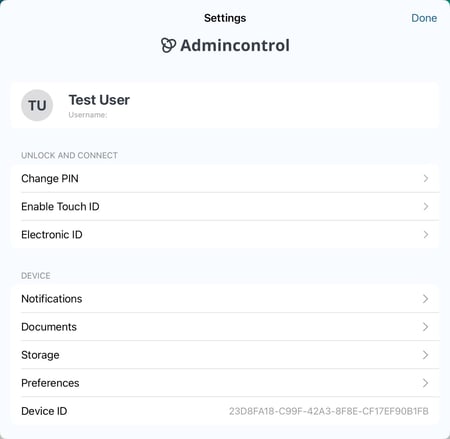
Change Your PIN

To ensure your app remains secure, you can update your PIN-code:

  • Go to Settings > Change PIN.
  • Follow the prompts to set a new PIN. Remember, a PIN is essential for unlocking and using the app.
settings in the app

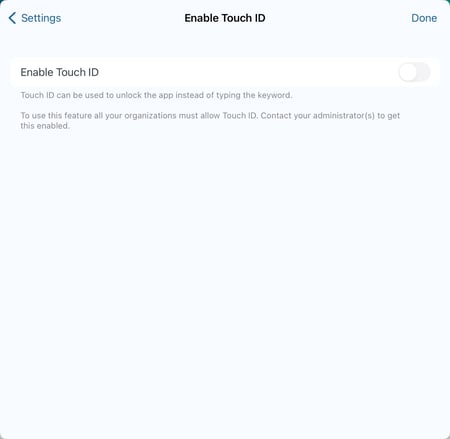
Enable TouchID or FaceID

For a quicker unlock experience, turn on biometric authentication:

  • Navigate to Settings > Enable TouchID.
  • Toggle the feature on/off. It works seamlessly with both TouchID and FaceID.
enable touch ID

Customizing Document Preferences

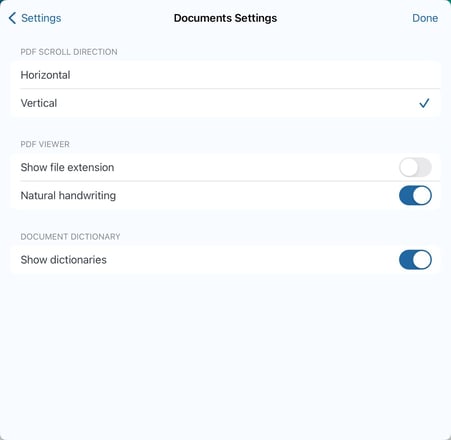
Document Settings

Personalize how documents are viewed by adjusting these options:

  • Head to Settings > Documents.
  • You can enable features like scroll direction, display file extensions, and dictionary usage for a better reading experience.
document settings

Additional Security and Troubleshooting

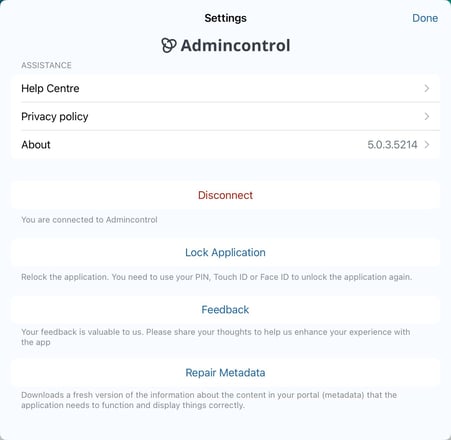
Disconnecting the App

  • Scroll to the bottom of the settings page and select Disconnect.
  • This will switch the app to offline mode, pausing data synchronization. Any data added while offline, such as annotations, will sync automatically once back online.

Lock the Application

Lock your app for immediate security:

  • Choose Lock Application to go to the lock screen.
  • Use TouchID or your PIN-code to unlock.

Repair Metadata

  • Use Repair Metadata to refresh the data available from your portal. This can help resolve synchronization problems.
go offline or repair metadata under settings













