
 Boards & Governance
 M&A & Transactions




.png)





.png)
 Board Management Software
 Customer stories
 Insights
 Events & Webinars
 Security & Privacy
 Product updates

.jpg)




-Jul-03-2026-06-32-50-9626-AM.png)
 Login
Login
July 2022
Board portal release notes – July 2022. This release adds time zone information to meetings, which removes a common source of confusion for boards whose members join from different countries.
Timezones in meetings
We have now introduced a visualization of timezone in meetings. This will remove any confusion about the actual meeting time in cases where there are meeting participants from more than one timezone. In the meeting overview, each user will see the meetings in the timezone of their own profile, and in the meeting notifications they will see in which timezone the meetings are created.
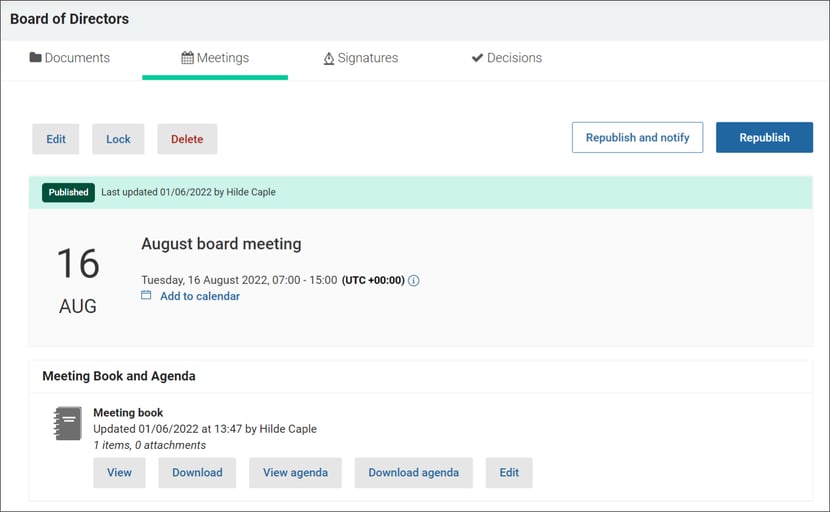
Timezone settings can be found under User profile, and we offer the secretary an option to verify the all users’ timezone settings in the Setup Users report.
What this means for you
- Your own time zone in the overview. Every user sees meeting times converted to the time zone set on their own profile, so a meeting created in Oslo shows the correct local time for a member in London.
- Clear notifications. Meeting notifications state the time zone in which the meeting was created, so recipients can double-check the time when they add it to their own calendar.
- Check your profile. The conversion is only as good as the time zone on your profile. Open User profile and confirm that the time zone matches where you normally are.
- For secretaries. The Setup Users report includes each user's time zone setting, so you can verify the whole board in one place before sending invitations.
- Example. A meeting created for 09:00 Central European Time is shown as 08:00 to a member whose profile is set to UK time, while the notification states that the meeting was created in Central European Time, so both readings agree.
Applies to: Board portal web application.
Related help articles: Personal user settings, Create a new meeting, Publish the meeting and notify users, Set up and add new users.